


AI Voice Sticker & Coloring Page Printer for Kids
- Say an idea, get a sticker or coloring page
- Prints with no ink or toner
- Preview each design on a 2.8 in color screen
- Gift boxed with 4 rolls ready to print
Couldn't load pickup availability
Details
Details
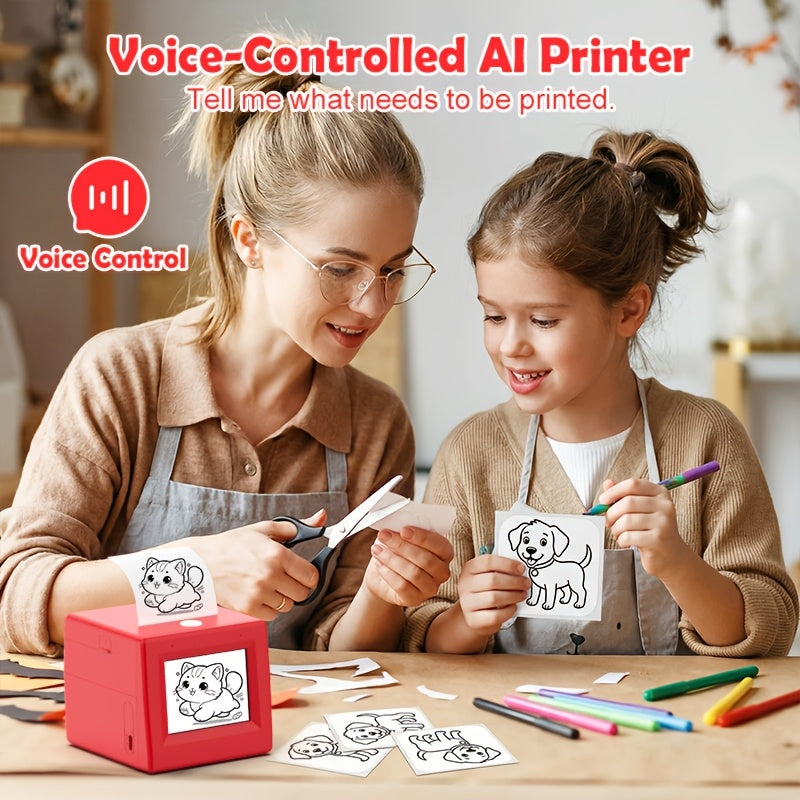
Your kid describes an idea, this little cube turns it into a fresh design. Hold the AI button, say the idea, and a line drawing appears on the color screen, ready to print as a sticker or a coloring page. No ink, and no more scrolling for printables.
Features
- Voice to print: hold the AI button, speak an idea, get a sticker or coloring-page design.
- 2.8 in color screen: preview every design before it prints.
- Inkless thermal printing: 200 dpi black-and-white prints on 57 mm rolls, no cartridges.
- Multilingual: understands speech in multiple languages.
- More in the free app: picture-to-sticker, text scan, banners, memos, to-do lists, labels and templates.
- Backpack size: a compact cube, about 94 x 81 x 89 mm, that fits in a backpack.
Specifications
- Size: about 94 x 81 x 89 mm (3.7 x 3.2 x 3.5 in)
- Weight: 0.76 lb
- Printing: thermal, black and white, 200 dpi
- Paper: 57 mm thermal and self-adhesive sticker rolls
- Screen: 2.8 in, 320 x 240 color
- Connection: 2.4 GHz WiFi only (5 GHz not supported), companion app for iOS and Android
- Audio: built-in mic, 2W speaker
- Charging: USB-C
- Color: Red
What's in the box
- 1 x mini sticker printer (red)
- 3 x self-adhesive sticker rolls (57 mm)
- 1 x plain thermal paper roll (57 mm)
- 1 x USB-C charging cable
- 1 x multilingual user manual
- Gift box
Shipping & Returns
Shipping & Returns
Shipping: free on orders over $100, otherwise $6.95 in the US and $9.95 internationally. In-stock items dispatch in 2 to 4 business days and arrive 7 to 12 business days later, tracked and insured.
Returns: if your order arrives damaged, faulty or is not what you ordered, email support@slayharbor.com within 60 days of delivery with a photo and we replace or refund it, return shipping on us. Full details on our refund policy.
AI Voice Sticker & Coloring Page Printer for Kids


Why it works
Big imagination, tiny printer
From their words to paper
Hold the button, say "a dinosaur on a skateboard," and a fresh line drawing appears on screen, ready to print.
See it before it prints
The 2.8 inch color screen previews every design, so kids can check it before it prints.
Stickers, lists and labels too
In the free app, turn a picture into a black-and-white sticker or print to-do lists, memos, banners and labels.
The printables problem
Kids dream it up faster than you can find it
A unicorn in a rocket? A cat chef? Hunting for a matching coloring page, then coaxing the home printer, kills the moment. Here they say their idea and get a fresh design to print.
Get yoursHow it works
How it works
- 1
Set it up
Download the free companion app and pair the printer to your 2.4 GHz WiFi network.
- 2
Hold and speak
Hold the AI button and describe an idea: a horse with wings, a cat astronaut, a dragon eating ice cream.
- 3
Preview, print, peel
Check the design on the screen, print it, then peel and stick it or grab the crayons.
The difference
Why not just use the home printer?
| Voice Sticker Printer | A regular home inkjet printer | |
|---|---|---|
| Prints a design from a spoken idea | ||
| No ink or toner cartridges | ||
| Sticker rolls included in the box | ||
| Small enough for a backpack | ||
| Prints in full color | ||
| Runs on plain printer paper |
Questions
What do I need to set it up?
The free companion app (iOS or Android) and a 2.4 GHz WiFi network. 5 GHz networks are not supported, so make sure your router has a 2.4 GHz band turned on.
Does it print in color?
No. The screen is in color, but prints come out black and white at 200 dpi, which is exactly what you want for coloring pages and line-art stickers.
Does it need ink? What refills does it use?
No ink or toner. It prints on 57 mm thermal paper or self-adhesive sticker rolls, which you buy as refills. You get 3 sticker rolls and 1 plain roll in the box.
Can it print more than drawings?
Yes. Through the app you can turn a picture into a sticker, scan text, and print banners, memos, to-do lists, labels and journal stickers.
What colors is it available in?
Red is the only color we carry right now.
What if it arrives damaged or not working?
Email support@slayharbor.com with a photo within 30 days of delivery and we will send a replacement or a full refund. Change-of-mind returns are not offered.
TRENDING NOW
-
Savings Challenge Cash Binder with Clear Pockets and 100-Box Tracker
Regular price $19.99Regular price $19.99Unit price per -
AI Voice Sticker & Coloring Page Printer for Kids
Regular price $59.99Regular price $59.99Unit price per -
Cordless Rechargeable Waterless Essential Oil Diffuser
Regular price $29.99Regular price $29.99Unit price per -
Handheld Shower Head with Multiple Spray Modes and Stop Button
Regular price From $24.99Regular price From $24.99Unit price per


